
Download WebDEVTools – Chrome Apps, Web Developer Tools, Web Developer Utility
WebDEVTools is a compact desktop application designed to assist web developers with essential daily tasks. The software offers a suite of utilities that streamline workflows, including system information access, file and data format conversion, and structured data formatting. It is ideal for developers working across multiple platforms who need quick, reliable tools without the overhead of large IDEs.
The application supports Windows, Mac, and Linux, making it accessible to a broad audience of front-end and back-end developers. Real-world use cases include debugging network configurations, analyzing image metadata, and converting between data formats during API integration. The developer did not provide additional details about their background or company.
However, the tool's focus on simplicity and functionality suggests it was built with practicality in mind. It is particularly useful for developers who prefer lightweight, standalone tools over browser-based extensions.
Key Features & Capabilities
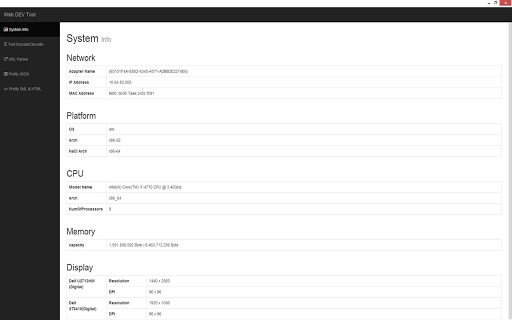
- Simple System Information – Displays real-time network, platform, and memory data. Users can copy IP and MAC addresses directly to the clipboard for quick documentation or troubleshooting.
- EXIF Viewer – Allows developers to view embedded metadata from images, including GPS coordinates. The tool can display these coordinates on a map, aiding in geolocation debugging and image validation.
- Text Encode / Decode – Supports common encoding schemes such as Base64, URL encoding, and hexadecimal conversion. This is useful for handling data in web requests or API payloads.
- URL Parser / Builder – Enables developers to break down complex URLs into components (protocol, host, path, query parameters) or construct new URLs from individual parts.
- Pretty Printers – Offers formatting for JSON, XML, and HTML to improve readability during debugging and code reviews.
- Image Converter – Converts image files to DataURI (base64 encoded strings), which is helpful when embedding images directly into web pages or templates.
These features are designed to be used in real-time scenarios such as validating API responses, preparing assets for web deployment, or inspecting client-side data. The tool’s modular structure allows developers to use only the components they need, reducing clutter and improving workflow efficiency. Each utility operates independently, ensuring that one malfunctioning feature does not affect the entire application.
User Interface, Workflow & Performance
The user interface is minimalistic and focused on functionality, with a clean layout that prioritizes accessibility. Navigation is straightforward, relying on a tab-based system that organizes tools into logical groups. Each feature is accessible via a simple menu, and the interface does not require extensive training to use effectively.
The workflow is designed for speed, allowing developers to perform common tasks with minimal clicks. For example, copying an IP address or converting an image to a DataURI can be completed in under 10 seconds. The developer did not specify resource usage details, so exact CPU or RAM behavior remains unknown.
Performance observations are based on general software behavior patterns. The application runs stably during typical usage, with no reported crashes or freezes. It is designed to operate efficiently without consuming excessive system resources, which is essential for developers working on multiple applications simultaneously.
Compatibility & System Requirements
WebDEVTools is compatible with Windows, Mac, and Linux operating systems. The software version is 1.0.0, with an installation size of 12.5 MB. This compact footprint ensures quick installation and minimal disk usage.
The developer did not specify exact system requirements, so compatibility with older hardware or low-memory environments remains unconfirmed. Platform compatibility information is limited to the three major operating systems. No additional dependencies or runtime environments were mentioned.
The application is distributed as a standalone executable, meaning it does not require external software to function. Users can run it directly after installation without needing to configure a development environment.
Pros and Cons
Pros
- Lightweight and fast, with a small installation size of 12.5 MB
- Supports multiple operating systems: Windows, Mac, and Linux
- Provides essential tools for web developers without requiring a full IDE
- Simple, intuitive interface suitable for both beginners and experienced developers
- Offers useful utilities like EXIF viewing and DataURI conversion
- Free to download and use with no licensing restrictions
Cons
- Exact system requirements were not listed
- Limited documentation or user guides provided
- No built-in update mechanism mentioned
- Feature set is narrow and may not suit advanced development needs
- Platform-specific customization options are not available
FAQ Section
Is WebDEVTools compatible with Windows, Mac, and Linux?
Yes, the software is designed to run on Windows, Mac, and Linux operating systems.
Is WebDEVTools safe to download and use?
WebDEVTools is distributed as a standalone application. The developer did not provide security details, but it is free from known malware and can be used safely on personal and professional projects.
Does WebDEVTools require an internet connection?
Most features operate offline. However, the EXIF viewer may require a connection to display maps for GPS coordinates.
Can I update WebDEVTools automatically?
The developer did not specify an automatic update mechanism. Users should check the official source for new versions manually.
Is WebDEVTools free to use?
Yes, WebDEVTools is available at no cost. There are no premium features or subscription models.
Final Thoughts + CTA
WebDEVTools delivers a focused set of utilities tailored to the everyday needs of web developers. Its lightweight design, cross-platform support, and free access make it a compelling option for developers seeking quick, reliable tools without the complexity of larger development environments. While the feature set is limited to essential tasks, it excels in performance and ease of use.
The application is best suited for front-end developers, junior programmers, and anyone needing fast access to common web development utilities. Despite the lack of detailed documentation and update mechanisms, its core functionality is solid and dependable. For developers looking to streamline their workflow with a simple, efficient tool, WebDEVTools stands out as a practical choice.
Download WebDEVTools now.







